
Tours
TourWhat Center
Is UVTours?
TourUVTours Centeris OverviewUVA’s structured tour system.
ToursA offertour ouris pilotsa themulti-leg opportunityflight toexperience exploredesigned regionsaround theya mightspecific nottheme, typicallyregion, ventureaircraft into,type, presentingor uniqueoperational andobjective.
Each tour features a distinctive theme and is adaptable to any aircraft type within our comprehensive database. However, it's crucial to note that not all airports encountered during these tours can accommodate every aircraft type. Tours consistconsists of pre-plannedsequential flight legs or flights that must be undertakencompleted in aorder.
How UponTours successfulWork
Every tour includes:
-
A defined list of
aflighttour, pilots earn a commendation displayed on their profile page.legs -
ToSpecificaccessdepartureourandTours,arrivaluseairportsthe -
navigationAircraft
onrestrictionsthe(ifcrewapplicable)site. -
Sequential progression requirements
You must complete each leg before advancing to the 'Activities'next.
Skipping andahead thenis selectnot 'Tours.'permitted Uponunless enteringexplicitly allowed by the Tourtour Center,design.
Tours viewOverview displays all available tours for your consideration.Page
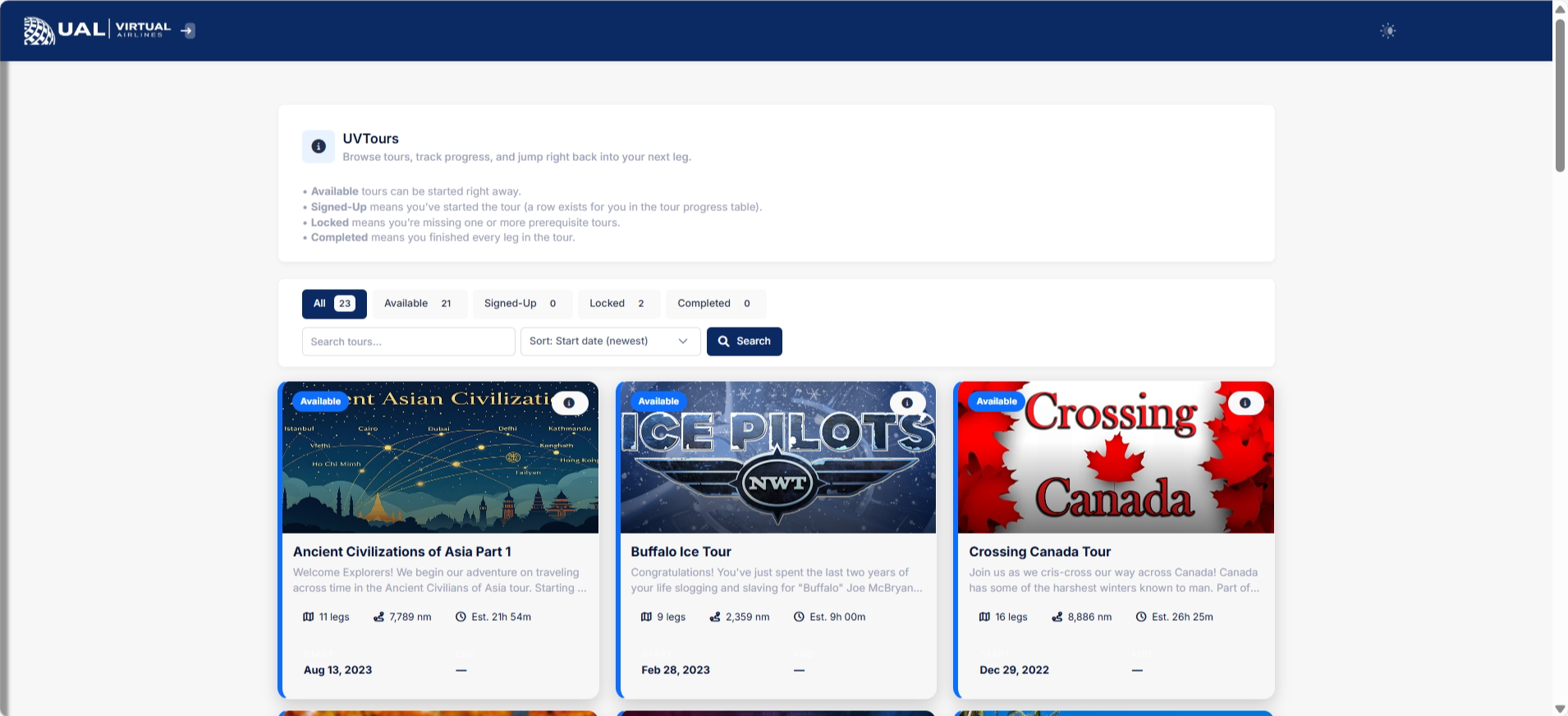
The tours featured inOn the imageUVTours abovepage, representyou justwill a glimpse of the diverse offerings available. For a comprehensive and up-to-date list of all available tours, kindly visit our crew website. The complete catalog provides a broader array of exciting opportunities for pilots to embark on unique and captivating journeys.
Tour Status and Categorization
The colored ribbons situated in the top corner of each tour serve as indicators of the tour's status concerning your participation:see:
GreyRibbon:Active
AvailableToursfor Sign-UpYellowRibbon:Completed
Signed-upToursand in the process of completionGreenRibbon:Tour
Successfully Completed
At the top of the page, the tours are classified into three distinct categories for ease of navigation:descriptions
All Tours:Displays the comprehensive list of available toursBookedTours:Progress
Showcasesindicatorstours for which you are currently signed upCompletedTours:Status
Highlightsbadgestours that you have successfully completed
This categorizationpage systemshows streamlineswhere theyou viewingcurrently experience,stand allowingacross pilotsall toavailable efficiently track and manage their tour engagements.tours.
Tour Details
To access more in-depth information about a particular tour, simply click on the corresponding image displayed on the main screen. This action provides a comprehensive overview, allowing you to delve into the specifics of the tour's theme, planned legs, and any unique features it may offer.

Tour Details Page
Navigation
Upon entering the tour details page, the top section features the tour image along with a concise Tour Description. To access the complete description, click on the box labeled 'Tour Description' to expand and reveal the full details.
Should you wish to enroll in the tour, locate the blue 'Sign Up' button beneath the description and click on it.
Congratulations! You are now officially signed up for the tour. Continue scrolling down the page for additional information and insights into your chosen tour.
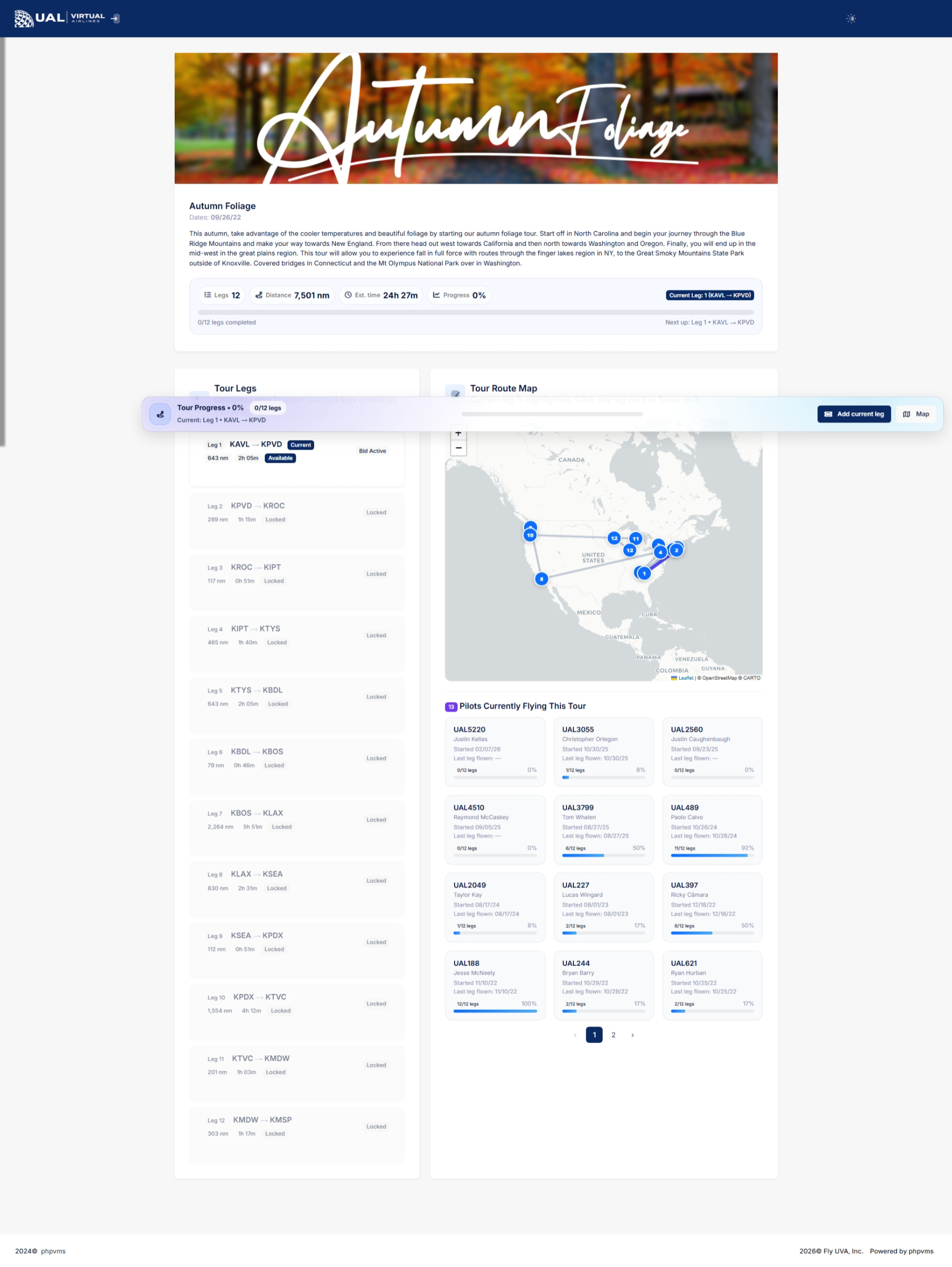
In this section, a map visualizes the various legs of the tour. The starting point is denoted by the green flag, while the red flag signifies the concluding point. Numbered flags represent the individual legs or flights between the start and end.
Adjacent to the map, a list of flights is presented. Each flight entry includes essential details such as Airports, Flight Time, and Mileage. To integrate these flights into your bids, simply click the blue '+' button.
Keep an eye out for yellow buttons featuring a clock icon; these indicate flights that are yet to be completed. It's imperative to adhere to the designated order of flights during the tour progression.
Adding Flights to Bids
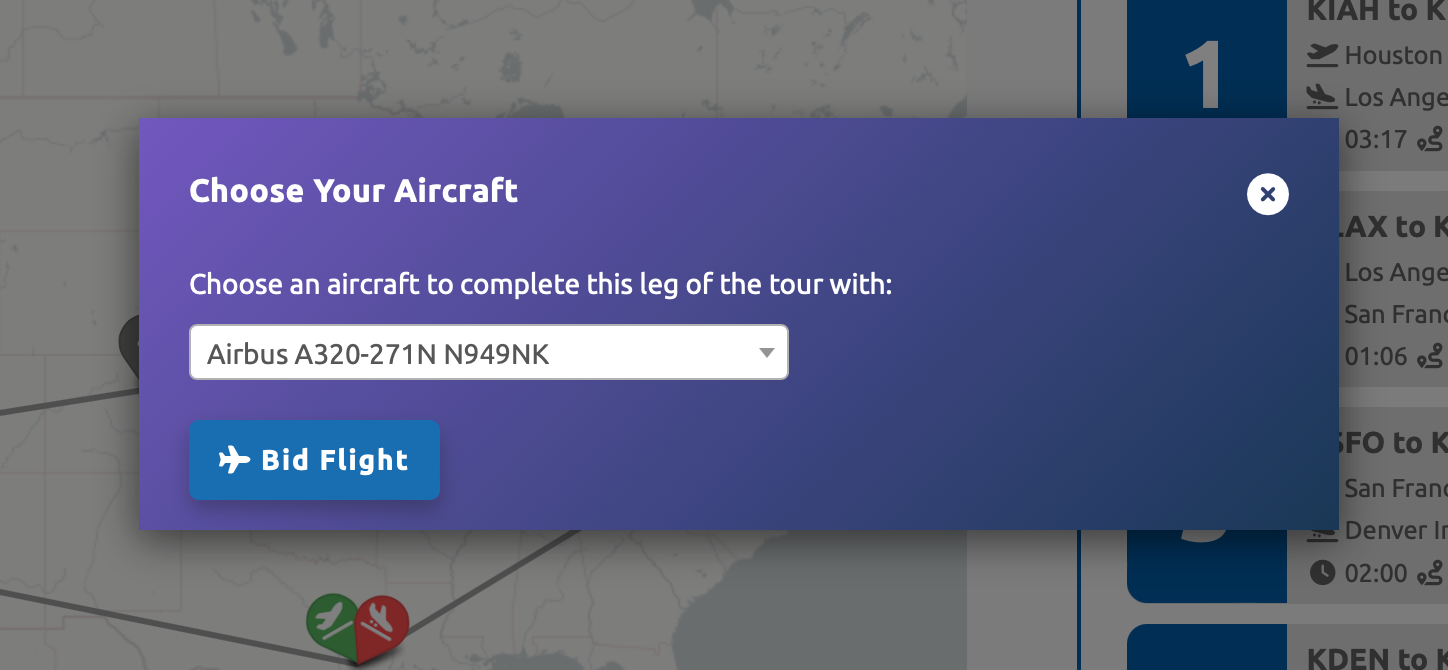
When clickingyou the blue '+' button to addopen a flight to your bids, a pop-up will prompt you to select your aircraft for the specific flight.tour, Chooseyou’ll from any aircraft available in our database.see:
-
It's essential to note that certain tours may necessitate flying into compact airports with short runways. Take heed of runway lengths at these airports to ensure you select an appropriate aircraft. Opting for a B747-400 on aFull tourleg involving a 3,000ft runway, for instance, would not be ideal.descriptionAfter -
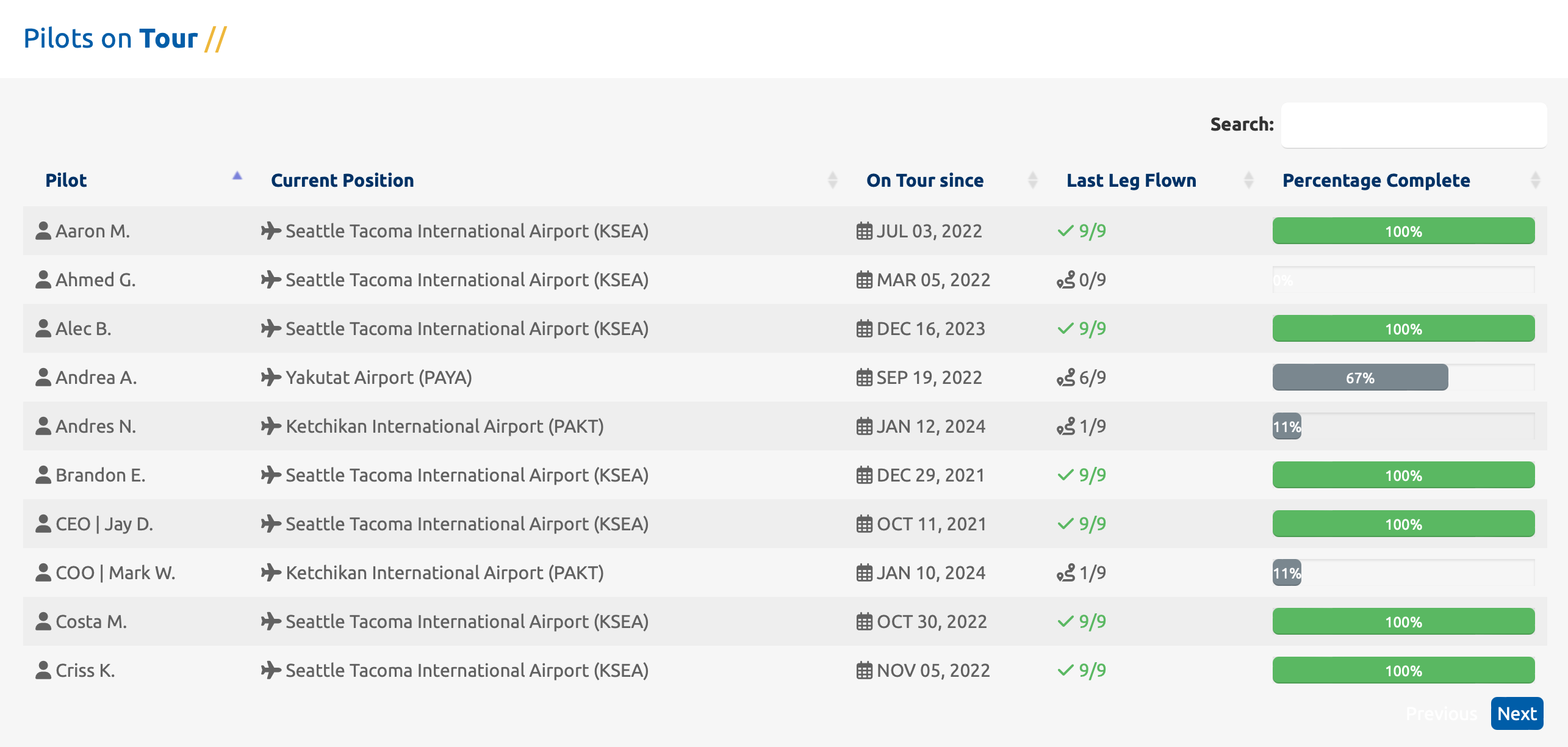
Towards the bottom of the page, you'll encounter a table displaying all pilots who have signed up for the tour, along with their progress. This provides a collective overview of the pilot community engaged in the same tour.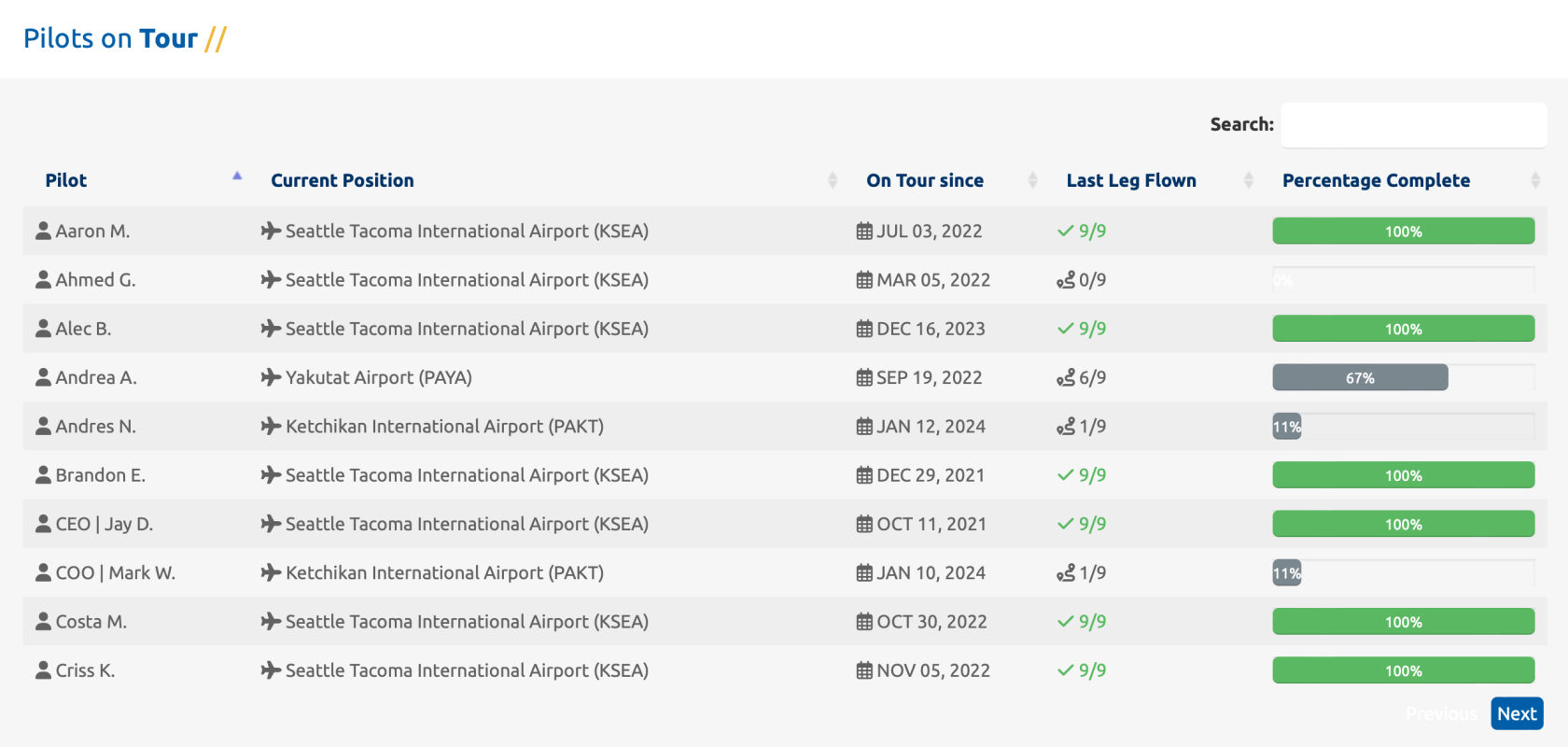
Tour Participant InformationExplore the tour landscape by accessing information about fellow pilots who have signed up for the same journey. The table offers insights into each participant, including their current location on the tour, sign-up date, theTotal number of legsflown, -
Your current progress
-
Leg-by-leg breakdown
-
Status indicators for each leg
Leg statuses may include:
-
Completed
-
Current / Up Next
-
Locked
Only the current leg is eligible to be flown.
Completing a visualTour representation of their progress.Leg
PleaseTo be aware that oncecomplete a tourleg:
-
successfullyBid
completed,the correct scheduled flight. -
Fly the exact route listed.
-
Submit your PIREP.
-
Ensure it is
not open for reflight. This policy ensures a diverse and continually evolving tour experience for all participants.accepted.
Once accepted, the system advances you to the next leg.
StalledTour Tours
Progression For any issues related to tour advancement, please follow the steps outlined below.
Rules
ChecktoLegs
seemust be flown in order.-
The flight must match the leg’s route.
-
The PIREP must be accepted.
-
Aircraft restrictions must be followed if
yourspecified.pirep
If a PIREP is approvedrejected, orthe showsleg statusdoes pending.not Yourcount.
If the PIREP is pending, the tour will not advance inuntil the event your pirepit is flaggedfinalized.
Tour review.Completion
When approvedall proceedlegs toare thecompleted:
-
IfThe
pending reviewed, theretour isnothingmarkedmorecomplete.that you need to do., IftheAwards
existing(ifflightconfigured) are issued.-
Your completion status is
stillrecordedactivepermanently.
Completed tours remain visible in your bidshistory.
Why Participate in Tours?
UVTours provide:
-
Structured flight progression
-
Themed operational experiences
-
Long-term flying goals
-
Award eligibility
-
Recognition within the
flightcommunityin SmartCARS, and delete the flight from your bids. Navigate back to the Tour page.Rebid the leg from the Tour page.Go to "My Bids."File a Manual PIREP—this step is crucial. Make sure the manual PIREP is created from the bid associated with the Tour (not just a bid from the schedule search page). In the comments, include For Tour Advancement. The status of your tour will be verified at our earliest availability and any advance any stalled progress at that time.In the event the system marks your tour as complete prior to the last leg being flown, the system is set to auto refresh every 4 hours so check back in a little while and see if it has reset.
Important Notes
-
VideoToursReference:https://youtu.be/kb2ZNVjrE9s?si=_p4Auxox08cs3tO-require accepted PIREPs. -
Manual PIREPs must meet validation standards.
-
AutoPIREP scoring still applies.
-
Only one active bid is allowed at a time.
-
Tour legs must be completed in sequence.