PIREPs (Pilot Reports)
A PIREP is a Pilot Report. It contains the information about the flight you flew and submitted via our ACARS software.
View My PIREPs
What Is a PIREP?
A PIREP (Pilot Report) is your official flight record.
After completing a flight and submitting it through ACARS, your PIREP becomes a permanent log of that operation.
This page allows you to review your flight in detail.
What You’ll See on the PIREP Page
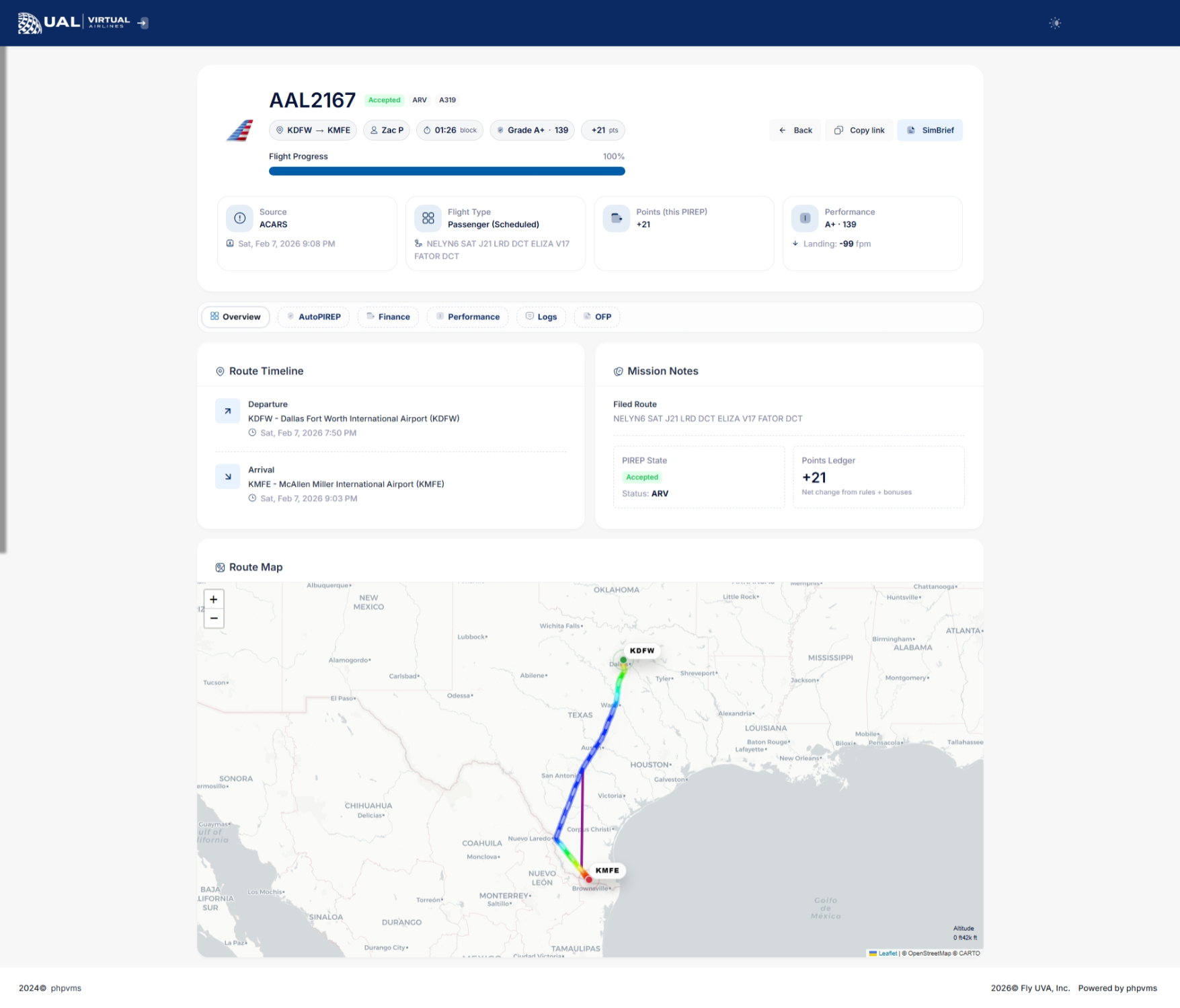
Your PIREP page includes a full breakdown of your flight performance and operational data.
Flight Summary
At the top of the page, you’ll see:
-
Airline and Flight Number
-
Aircraft and Subfleet
-
Departure and Arrival Airports
-
Block Time
-
Route information
-
Submission time
This confirms the basic details of your flight.
Performance Overview
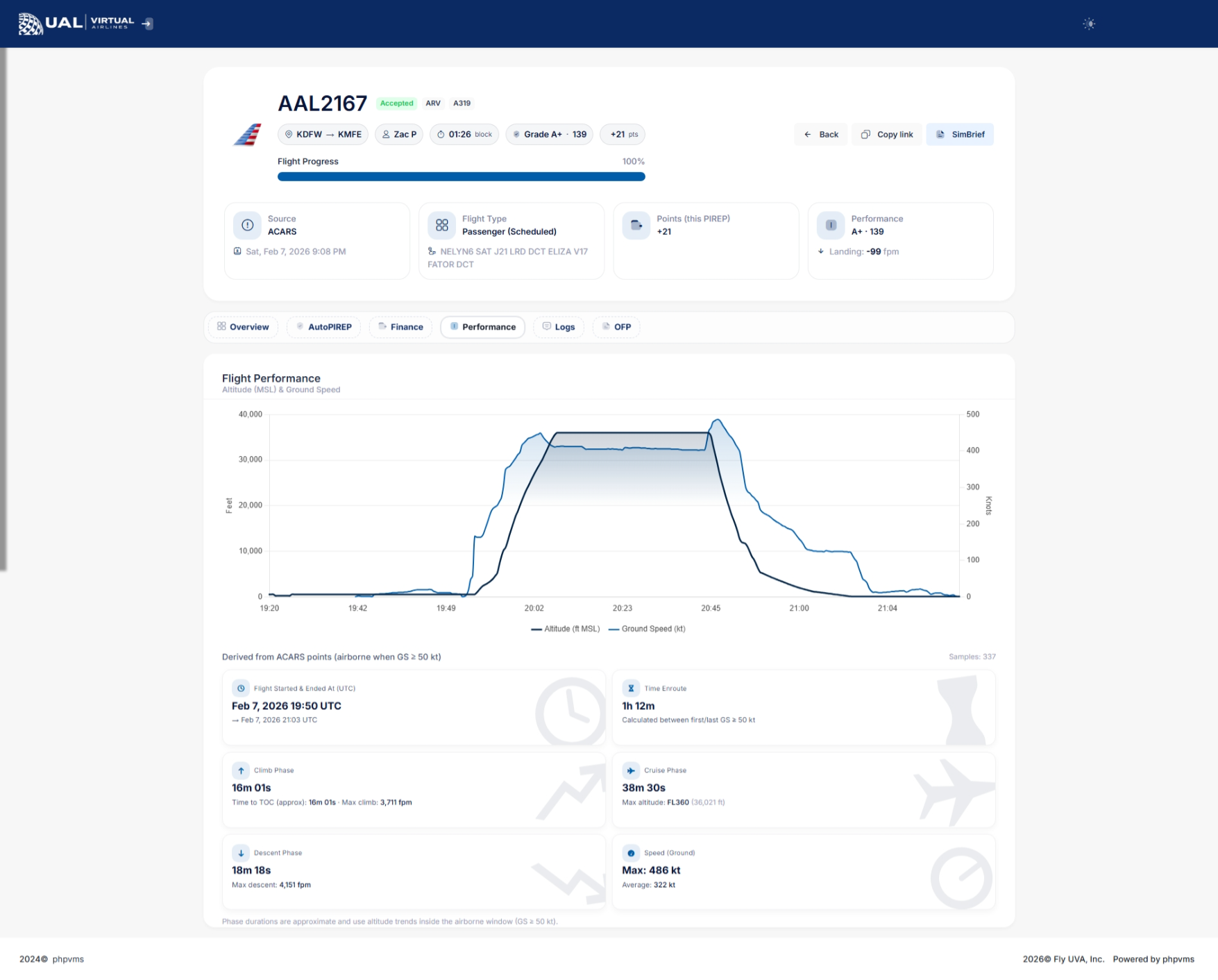
The performance section provides a detailed breakdown of how your flight was evaluated.
Depending on the flight data recorded, you may see:
-
Landing Rate (FPM)
-
Touchdown G-Force
-
Sim Rate Usage
-
Stall Detection
-
Overspeed Monitoring
-
Phase tracking (Climb / Cruise / Descent)
-
Maximum and Average Ground Speed
-
Maximum Altitude (shown as Flight Level)
-
Climb and Descent Rates
-
Time Enroute
This gives you insight into how your flight was scored.
AutoPIREP Grade
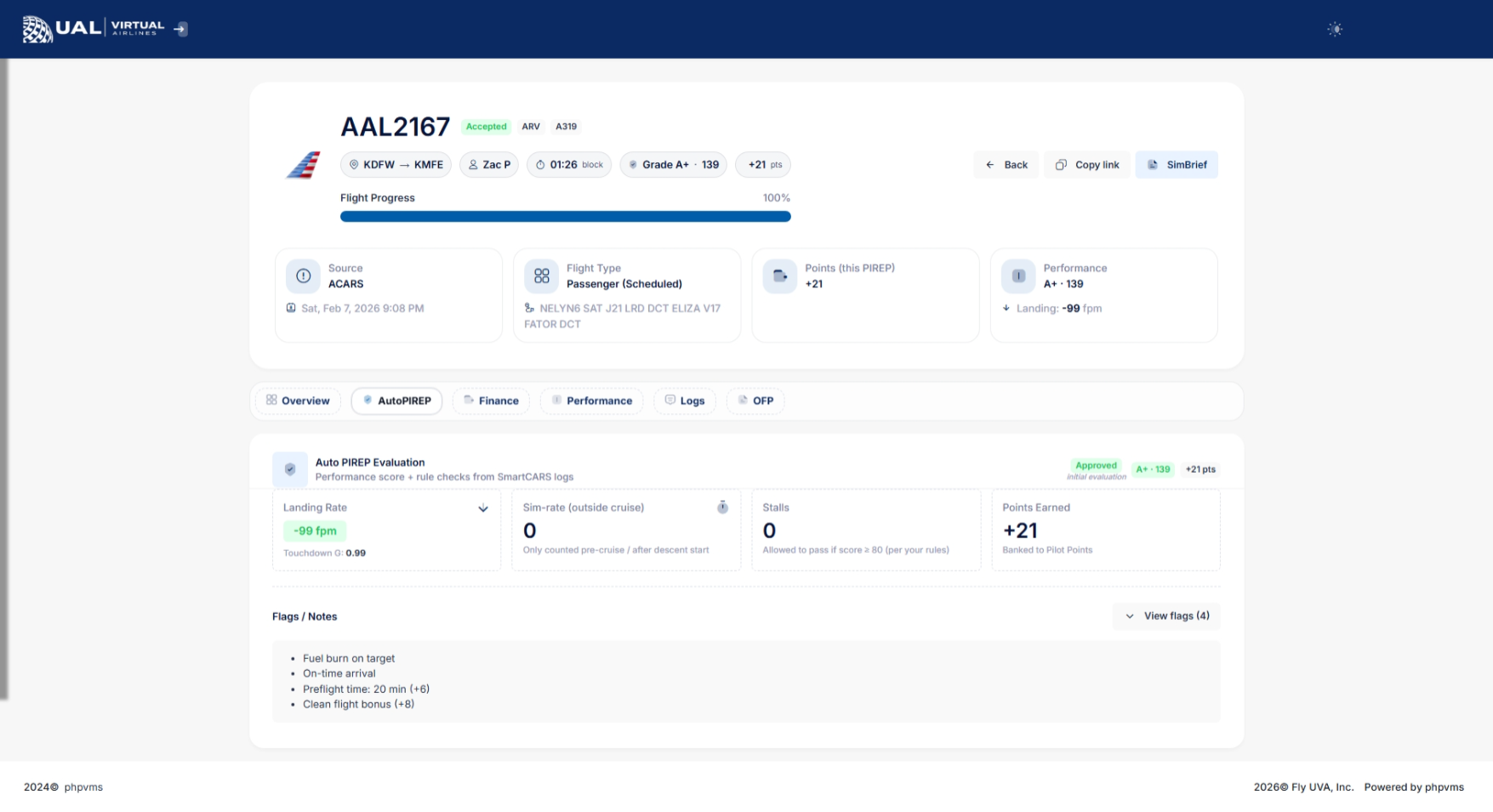
If AutoPIREP grading is enabled, your PIREP will display:
-
Numerical score
-
Letter grade
-
Decision status (Accepted, Pending, or Rejected)
-
Points earned
Flights that meet grading criteria are automatically accepted.
Flights that do not meet criteria may enter Pending Review.
Pending Status & Banked Points
If your PIREP enters pending status:
-
It is temporarily locked for review.
-
Staff cannot immediately modify it.
-
You may have the option to use Banked Points to force-accept the flight.
If available, you’ll see a button allowing you to use 150 banked points to accept the PIREP.
This system gives pilots flexibility while maintaining operational standards.
Flight Phases & Data Tracking
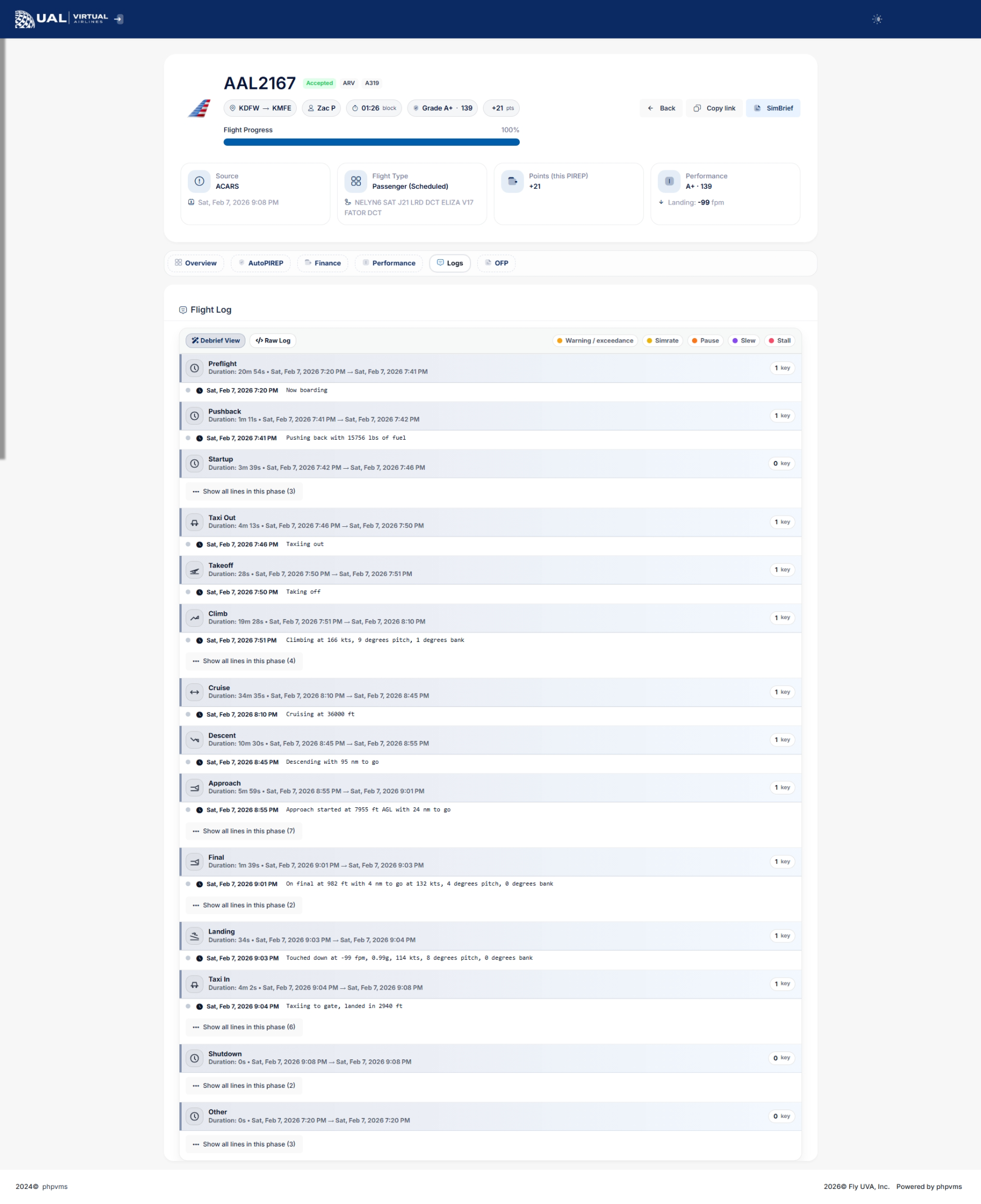
Your PIREP includes detailed phase tracking:
-
Climb phase begins once ground speed exceeds operational thresholds.
-
Cruise phase tracks maximum altitude achieved.
-
Descent phase tracks descent rates until ground speed drops below taxi thresholds.
This ensures realistic phase reporting and accurate performance metrics.
Status Indicators
Each PIREP will display one of the following statuses:
-
Accepted
-
Pending
-
Rejected
-
Cancelled
Status determines whether the flight counts toward hours, awards, tours, and career progression.
Why This Page Matters
Your PIREP page is more than just a record — it is your performance dashboard.
It allows you to:
-
Monitor your flying quality
-
Track landing consistency
-
Improve operational realism
-
Build toward awards, career levels, and achievements
Every flight contributes to your long-term record.
AutoPIREP
What Is AutoPIREP?
AutoPIREP is UVA’s automated flight evaluation system.
After you submit a PIREP, the system immediately analyzes your flight data and determines whether it:
-
Meets operational standards
-
Requires staff review
-
Should be rejected
This ensures fairness, consistency, and realism across all pilots.
What AutoPIREP Evaluates
AutoPIREP analyzes multiple performance factors from your flight data, including:
-
Landing Rate (FPM)
-
Touchdown G-Force
-
Sim Rate Usage
-
Stall Detection
-
Flight Phase Tracking
-
Time Enroute
-
Ground Speed Monitoring
Each metric contributes to your overall score.
Scoring & Grades
Each flight receives:
-
A numerical score
-
A letter grade
-
A system decision
The decision will be one of the following:
Accepted
Your flight met all required criteria and is automatically approved.
Pending
Your flight did not meet one or more standards and requires review.
Rejected
The flight significantly violated operational limits and was declined.
Pending Status Explained
When a flight enters Pending:
-
It is temporarily locked.
-
Staff cannot immediately modify it.
-
A waiting period is applied to allow pilot review.
This window exists to give pilots control over their own outcome.
Banked Points & Force Accept
If your PIREP is placed into Pending status, you may see the option to:
Use 150 Banked Points to Force Accept the Flight
Banked points are earned through normal flight activity.
Using points allows you to:
-
Accept a flight that narrowly missed criteria.
-
Avoid rejection.
-
Maintain continuity in tours, events, or career progression.
This system balances realism with flexibility.
Why AutoPIREP Exists
AutoPIREP ensures:
-
Consistent grading across all pilots
-
Reduced manual workload for staff
-
Transparent evaluation standards
-
Operational realism
-
Performance accountability
Every pilot is evaluated using the same system logic.
How It Impacts You
AutoPIREP affects:
-
PIREP acceptance
-
Logged flight hours
-
Awards eligibility
-
Career Mode progression
-
Event credit
-
Leaderboards and statistics
Flying within operational standards will almost always result in automatic acceptance.
Operational Expectations
To maintain high scores:
-
Avoid excessive sim rate usage
-
Monitor landing rate and touchdown control
-
Avoid stall conditions
-
Follow realistic climb and descent profiles
-
Maintain proper cruise altitude
AutoPIREP rewards smooth, realistic flying.
Manual PIREP
What Is a Manual PIREP?
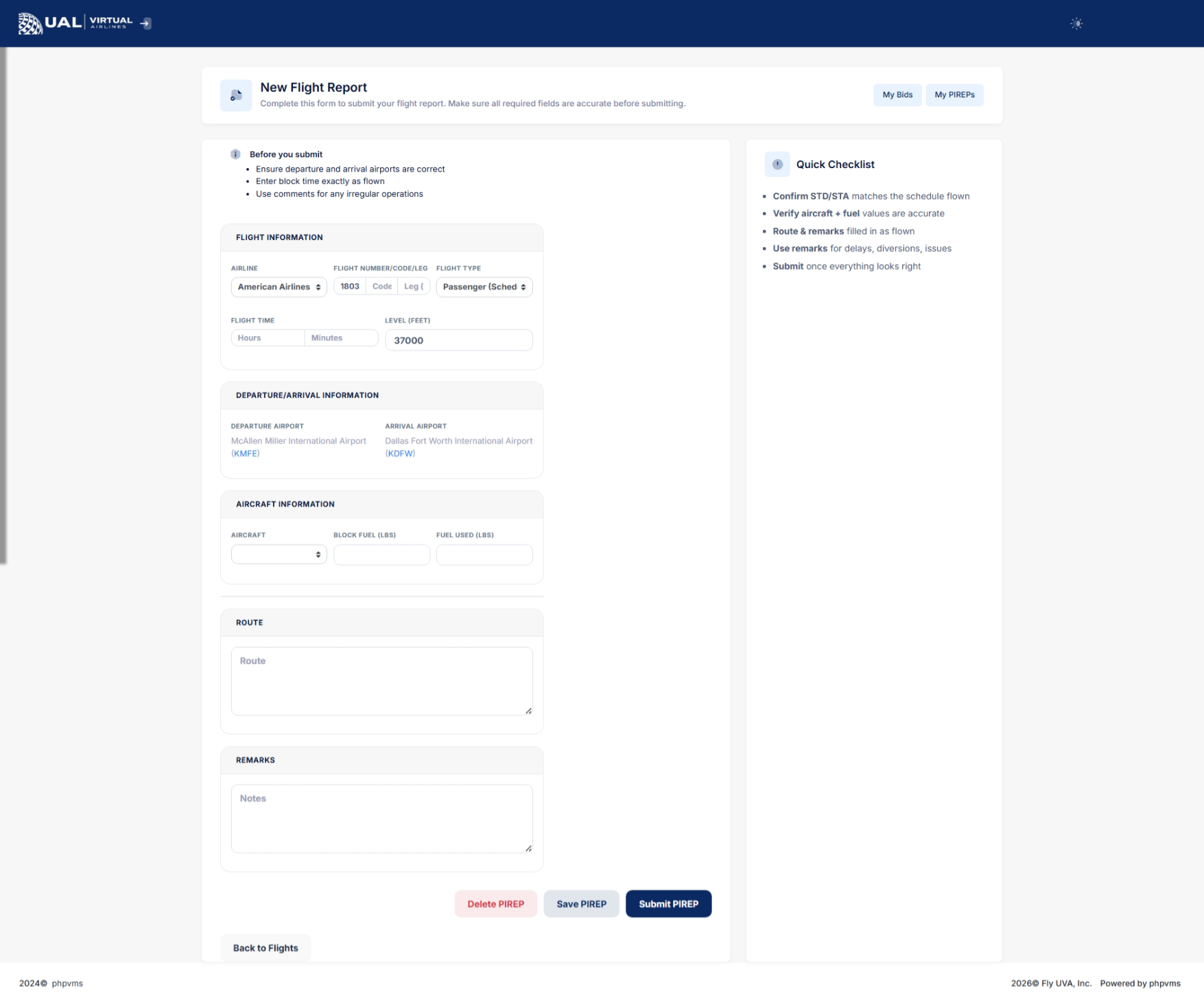
A Manual PIREP is a flight report submitted without using smartCARS.
At UVA, manual PIREPs are not the standard method of tracking flights. They exist strictly as a backup option when technical issues prevent smartCARS from functioning properly.
When Manual PIREPs Are Allowed
Manual PIREPs may only be submitted when:
-
smartCARS fails to connect
-
smartCARS crashes during the flight
-
A technical issue prevents ACARS tracking
-
A system outage occurs
Manual PIREPs are not to be used for convenience or preference.
If smartCARS is functioning properly, it must be used for all flight tracking.
Required Proof of Flight
If you submit a Manual PIREP, you must provide verifiable proof of the flight.
Accepted proof includes:
-
A direct link to your flight on VATSIM
-
A link to another recognized flight tracking network
-
Valid ACARS log evidence
-
Screenshot evidence showing full flight completion data
If proof is not provided, the Manual PIREP will be rejected.
Why Proof Is Required
Manual submissions do not contain the full telemetry data that smartCARS provides.
Requiring proof ensures:
-
Fairness across all pilots
-
Integrity of logged hours
-
Accurate tracking of flight performance
-
Protection against inaccurate reporting
How to file a manual PIREP
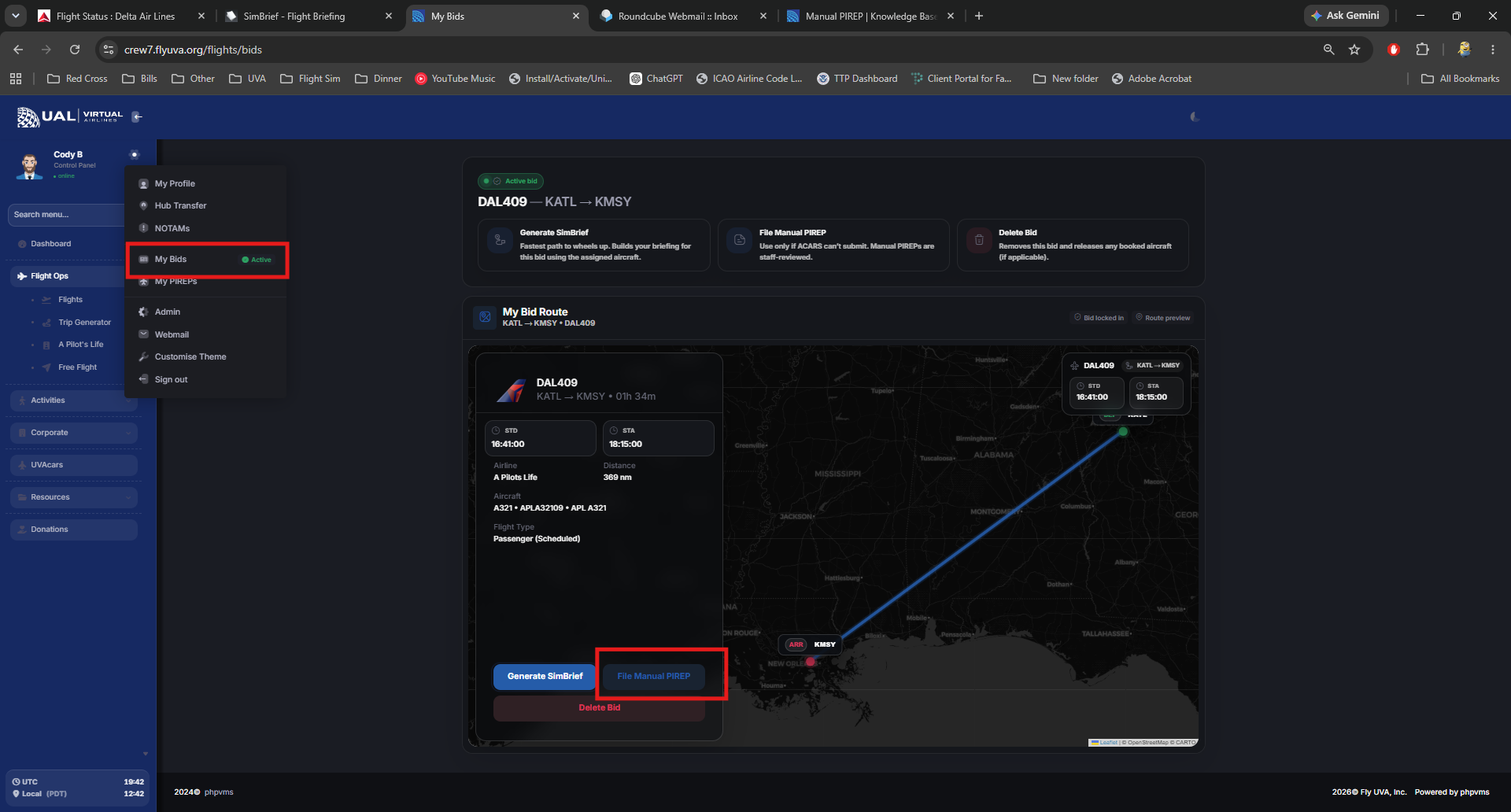
- From the the crew center click the cogwheel on the sidebar next to your profile image
- Select my bids
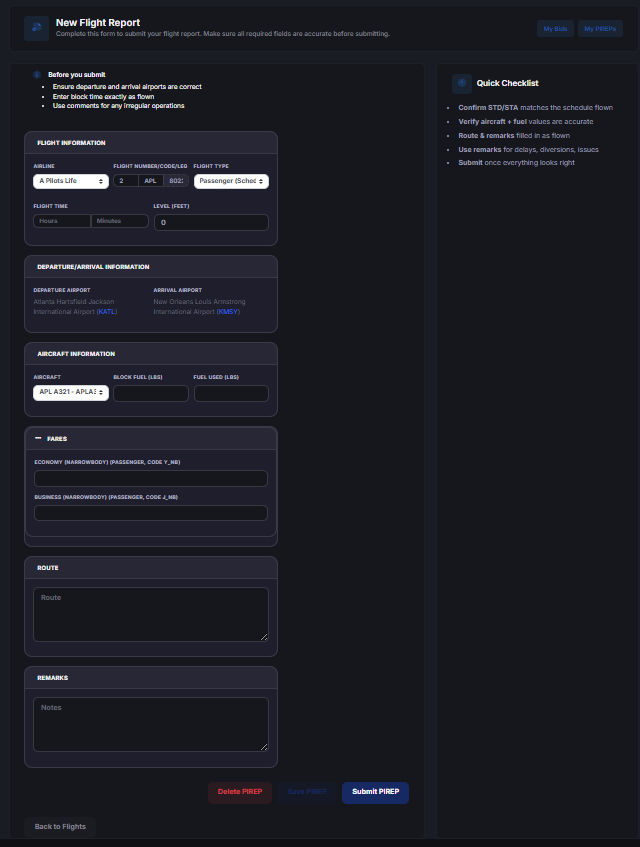
- Select File Manual Pirep
- Fill in all of the information needed and attach your proof of flight. The priep will not file if you do not fill out all of the needed information.
Manual PIREP Review Process
All Manual PIREPs are:
-
Reviewed by staff
-
Verified against provided proof
-
Subject to acceptance or rejection
Manual PIREPs are never automatically accepted.
Important Policy Reminder
UVAcars is the official and required flight tracking system at UVA.
Manual PIREPs are a contingency option — not a primary method of logging flights.
Repeated misuse of Manual PIREPs may result in rejection or further review.
AutoPIREP Approval Criteria
How the Scoring System Works
Every PIREP submitted through smartCARS is evaluated using UVA’s AutoPIREP scoring engine.
Each flight begins with a base score.
As the system analyzes your flight data, points are:
-
Deducted for operational violations
-
Maintained for compliant behavior
-
Awarded toward your final earned points
Your final score determines:
-
Numerical grade
-
Letter grade
-
System decision (Accepted / Pending / Rejected)
-
Points earned
Starting Score
Each flight begins with a base score of 100 points.
This represents a perfect operational flight.
Deductions are applied based on performance metrics recorded during the flight.
Performance Categories & Point Adjustments
1. Landing Rate (FPM)
Landing rate is one of the most significant scoring factors.
Typical evaluation tiers:
-
-1 to -200 FPM → No penalty
-
-201 to -400 FPM → Minor deduction
-
-401 to -600 FPM → Moderate deduction
-
Greater than -600 FPM → Major deduction
Excessively hard landings significantly reduce your score.
2. Touchdown G-Force
High G-force touchdowns result in additional deductions.
Smooth landings preserve your score.
3. Sim Rate Monitoring
AutoPIREP monitors sim rate usage.
-
Standard 1x rate → No penalty
-
Moderate increase → Minor deduction
-
Excessive sim rate usage → Larger deduction
Sim rate abuse directly impacts realism scoring.
4. Stall Detection
Each recorded stall event reduces your score.
Multiple stall detections may result in automatic Pending or Rejection status depending on severity.
5. Overspeed / Flight Envelope Violations
If the aircraft exceeds safe operational limits:
-
Point deductions apply
-
Severe violations may trigger Pending review
6. Phase Integrity
Your flight is analyzed across:
-
Climb phase
-
Cruise phase
-
Descent phase
Unrealistic profiles (extreme climb rates, unrealistic descent rates, abnormal cruise behavior) may result in deductions.
Grade Calculation
Once all deductions are applied:
Your final numerical score is calculated.
The system then assigns:
-
A Letter Grade (A, B, C, etc.)
-
A Decision Status
Higher scores result in automatic acceptance.
Lower scores may trigger Pending status.
Severely low scores may result in rejection.
Decision Thresholds
While exact internal thresholds may be adjusted over time, general logic is:
-
High Score → Automatically Accepted
-
Mid-Range Score → Pending Review
-
Low Score → Rejected
Flights that enter Pending status allow the pilot to review their performance before final determination.
Points Earned
In addition to scoring, flights may award operational points.
Points earned are based on:
-
Successful completion
-
Grade achieved
-
Compliance with system rules
These points contribute to:
-
Banked Points
-
Awards eligibility
-
Career progression
-
Leaderboards
Pending Status & Force Acceptance
If your score places you into Pending:
-
The flight is temporarily locked
-
Staff cannot immediately override it
-
You may use 150 Banked Points to force accept the PIREP
This system provides flexibility while maintaining standards.
What Causes Rejection
Flights may be rejected if:
-
Severe landing violations occur
-
Multiple stall events are recorded
-
Excessive sim rate abuse is detected
-
Unrealistic or invalid flight data is submitted
-
Required operational criteria are not met
Rejection removes the flight from accepted hours.
Why We Publish This
Transparency matters.
AutoPIREP exists to ensure:
-
Fair evaluation across all pilots
-
Consistent operational standards
-
Objective grading
-
Realistic flight behavior
Every pilot is evaluated using the same scoring logic.